Run  Qwen
Qwen
on your own machine
Any open-weight or custom model on your own hardware, with an OpenAI-compatible URL any app can use. No Docker, Python or GPU knowledge required — and nothing you send ever leaves your machine.
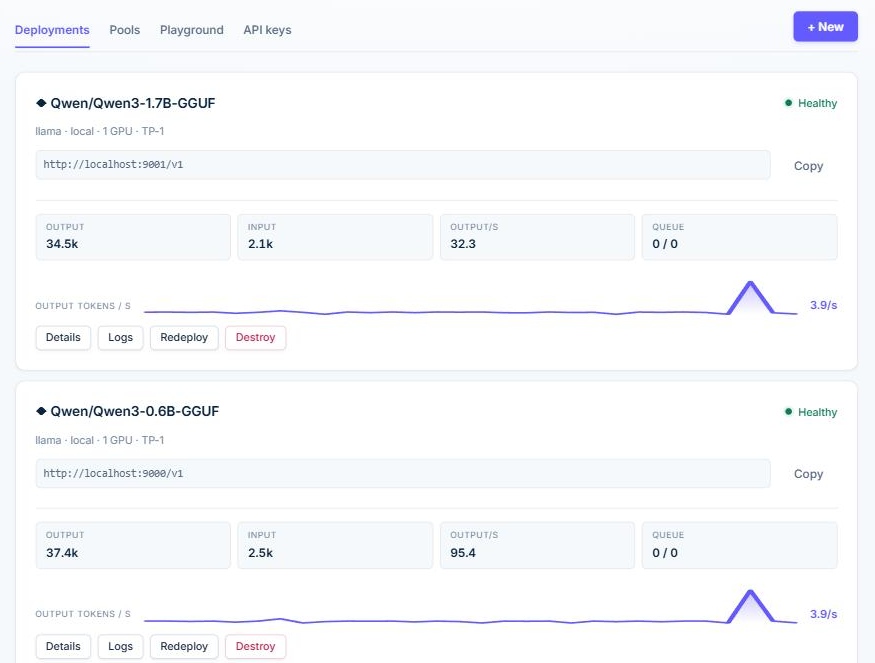
Deploy in one click
Pick a model, click Deploy, and get a link any OpenAI-compatible app can use. The platform decides the runtime, ports and GPU for you.
One command setup
Clone, run start.sh, done. The installer ships the Python env, the llama binary and Docker setup, all hidden.
GPU detected for you
NVIDIA GPU + Docker uses vLLM. GPU without Docker uses native CUDA. Anything else uses llama-server on CPU. Never a manual choice.
Router across models
Create a pool of 2+ models and the router picks the best one per message. Judge escalation, rule-based routing and round-robin included.
How it works
Create your account
Email and password, stored locally in your machine.
Pick a model
Qwen, DeepSeek, Mistral, Muse-Glimmer or Bonsai, from the provider catalog.
Deploy and use
Your deployment gets a URL and ready-made Python, JS and curl snippets.
Runs on your hardware
Models stay on your machine. No cloud API, no token metering, no data leaving your machine.
vLLM
High-throughput inference on NVIDIA GPUs with Docker. Prefix caching enabled by default.
llama-server
GGUF models on any machine, including vision (VLM). GPU via Docker, Vulkan or native CUDA.
Does the router actually work?
We measured it: 100 GSM8K maths problems on a single 6 GB NVIDIA GPU, every answer checked against the right number — no LLM grading another.
| Setup | Correct | Time per message |
|---|---|---|
| Qwen3-0.6B alone | 69% | 12 s |
| Router 0.6B + 8B, 1.7B judge | 87% | 39 s |
| Qwen3-8B alone | 93% | 107 s |
The router pays when the strong model is far more expensive than the cheap one; with a 0.6B + 1.7B pool it saved nothing. Times assume every model stays loaded. Method, raw data and what didn’t work →
Pricing
Everything on your own machine is free, forever. Pro is a subscription for running models on the servers you already have.
Free
- Unlimited models on your machine
- Router, pools and playground
- OpenAI-compatible API with account keys
- GPU detected and used automatically
- Open source (MIT)
- Community support on GitHub
Pro Beta
- Everything in Free
- Deploy to your own servers over SSH — unlimited machines
- One dashboard and one API for the models on all of them
- Nothing exposed on those machines: a private SSH tunnel
- Email support
- Cancel anytime — Pro keeps working until the end of what you paid
No per-user or per-token pricing: your models run on your hardware, and your prompts never pass through us.
Install in one command
Runs on Linux, macOS and WSL (Windows). No Docker, Python or GPU knowledge needed.
It opens http://localhost:3000 when it is done — create your account there and deploy your first model.
Your models. Your machine. Your URL.
Deploy your first self-hosted model in one command.
Install free